Should I break down my Blazor page into multiple components?
There are many good reasons to break down a Blazor page into multiple components.
Re-usability
This is the primary reason that will drive most people to build a component, and most of the time it's a very good reason.
Maintainability/Complexity
Lot's of small components are often easier to manage than one large component. Although there are trade-offs. For example, you will almost certainly need to have at least one parameter - maybe more for event callbacks. Arguably this can actually mean more code to maintain.
Performance
In some cases, breaking up a large component into smaller components can improve performance. But in order to leverage this you need to think carefully about what you're trying to achieve.
For example, if you load all of your data at page level, and then pass it down into your child components, then you're not going to see anything rendered until that initial data load has completed.
On the other hand, if the components have responsibility for loading their own data, then you will likely be able to render some parts of the page before all of your components have completed. This can certainly improve the user experience.
So would you ever deliberately avoid using multiple components?
I wouldn't say it's about deliberately avoiding smaller, self-contained components. I would say that it's more important to actually understand the impact that they have.
Simple Example with NO component breakdown
In this example Simple Flight Listings I've kept the component structure very simple for the flight results page. Each flight row (including the More Details section) is contained within a single Blazor component.
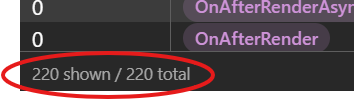
Right after you've loaded the page, take a look at the trace of lifecycle events in the Blazrlytics dashboard :
Complex Example with LOTS of component breakdown
In this example Complex Flight Listings I have broken down each flight row into multiple blazor components maximising re-use, and keeping each component nice and small for maintainability.
Take a look at the trace of lifecycle events in the Blazrlytics dashboard :
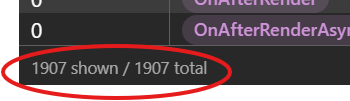
There are a much larger amount of lifecycle events running because there are now many smaller components being rendered.
On each of the two pages linked above why not explore the filters, sorting, and More Details sections, and watch the lifecycle events in the Blazrlytics dashboard. You will see that the simple example has a much smaller number of lifecycle events than the complex example.
Ok, but why should I care?
It's a good point. There may be many more thousands of lifecycle events, but if the page is still performing well, then does it really matter?
In fact you can see how long those lifecyle events take to execute in the Blazrlytics dashboard, and in most cases they don't take long enough to even register a value greater than 0 micro-seconds.
But if we add them all up, then we get an interesting picture. Let's export those events to a CSV and sum up the total time taken to execute all of those events:
| Total Lifecycle Events | Total Duration (micro-seconds) | |
|---|---|---|
| Simple Example Initial Page Load | 220 | 31,206 |
| Complex Example Initial Page Load | 1,907 | 208,855 |
That's a difference of 31ms vs. 208ms. That's a significant jump.
Let's clear the event trace, and then just modify the sort order of the flights, and see how many lifecycle events are triggered, and how long they take to execute:
| Total Lifecycle Events | Total Duration (micro-seconds) | |
|---|---|---|
| Simple Example Sort Order Change | 29 | 6,215 |
| Complex Example Sort Order Change | 956 | 30,569 |
As you can see, the numbers are again substantially larger for the complex version of the page with multiple child components.
Think about the implications of this on your memory and CPU usage for a large-scale application with hundreds, or thousands of users.
In summary ...
There are good reasons for breaking down your functionality into components. And most of the time, providing you don't go too far you're probably going to be fine.
Of course, logically this simply makes sense. The more lifecycle events that are executed, the longer a page will take to render.
But rather than simply guessing at the implications, why not use the Blazrlytics dashboard to see the actual impact of your decisions on the performance of your application.